
 Ali Raza Khan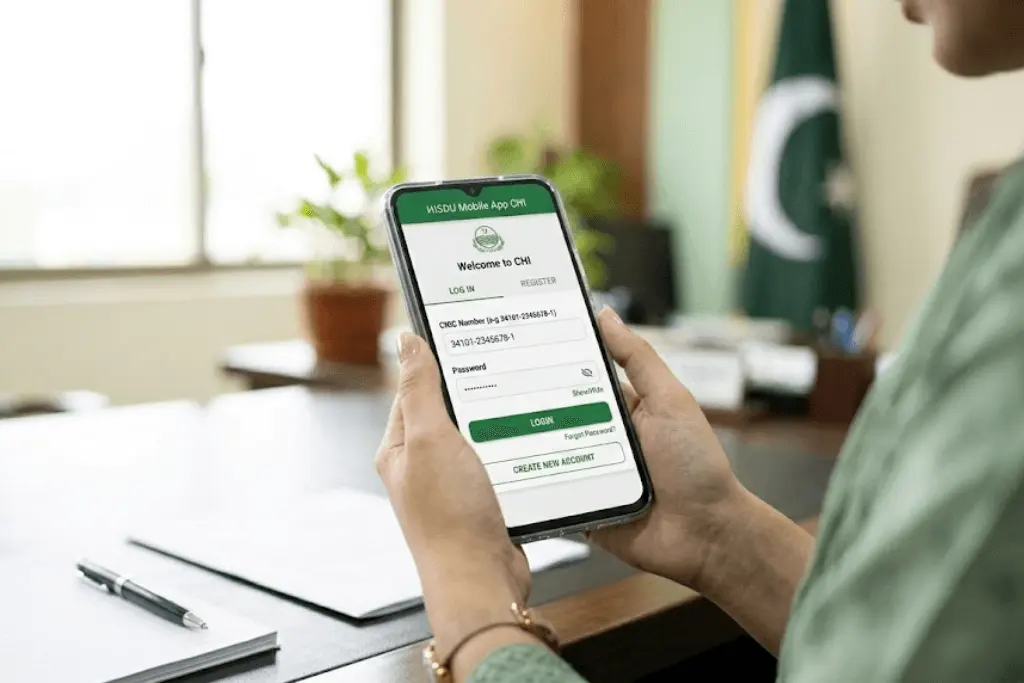
Introduction
The HISDU Mobile App CHI is a digital health platform designed to improve healthcare services in Punjab. It helps citizens access important medical information, register complaints, and stay connected with public health services directly through their mobile phones.
What is HISDU?
HISDU stands for Health Information & Service Delivery Unit. It is a government-backed initiative aimed at improving healthcare monitoring, transparency, and service delivery across Punjab.
Purpose of the HISDU Mobile App
The main purpose of the HISDU mobile application is to:
- Provide easy access to public health services
- Improve communication between citizens and health departments
- Track complaints and service issues
- Maintain digital health records
- Increase transparency in healthcare facilities
Who Should Use It?
The app is useful for:
- Punjab residents
- Patients visiting government hospitals
- Beneficiaries of public health programs
- Citizens who want to register health-related complaints
- Families tracking vaccination or medical services
What is HISDU Mobile App CHI?
The HISDU Mobile App CHI is part of Punjab’s digital healthcare monitoring system. CHI may refer to Citizen Health Interface, which focuses on connecting people directly with health services.
Full Form of HISDU
HISDU – Health Information & Service Delivery Unit
Role in Punjab’s Healthcare System
HISDU plays a key role in:
- Monitoring health facilities
- Recording patient data digitally
- Improving service quality
- Managing complaints
- Supporting vaccination and public health campaigns
It acts as a bridge between citizens and the health department.
Features of the HISDU Mobile App
The HISDU app includes several useful features designed for public convenience.
Digital Health Services
Users can access information about government health programs and services available in their area.
Patient Registration
Citizens can register their details for public healthcare services directly through the app.
Health Record Access
The app may allow tracking of medical visits, vaccination history, and other public health records.
Complaint / Feedback System
Users can submit complaints about hospital facilities, staff behavior, or service delays. Complaints are tracked digitally for follow-up.
Hospital and Clinic Information
The app provides details about nearby government hospitals, Basic Health Units (BHUs), and Rural Health Centers (RHCs).
HISDU Mobile App Registration Process (Step-by-Step)
Who Can Register?
- Residents of Punjab
- Individuals with a valid CNIC
- Beneficiaries of government health schemes
- Mobile phone users with an active number
How to Register on the HISDU App?
Follow these steps:
- Download the HISDU Mobile App from the official app store.
- Open the app and select the registration option.
- Enter your CNIC number and mobile number.
- Receive OTP (One-Time Password) for verification.
- Enter OTP to confirm your identity.
- Complete profile details such as name, address, and required health information.
- Submit the registration form.
HISDU Mobile App Login Process
How to Login
Once registered, logging in is simple:
- Open the HISDU mobile app.
- Enter your registered mobile number or CNIC.
- Enter the OTP received on your phone or your set password.
- Tap login to access the dashboard.
Services Available on the HISDU App, Punjab
The app offers multiple public healthcare services:
Health Facility Information
Users can check nearby hospitals, available services, and contact details.
Complaint Tracking
After submitting a complaint, users can track its status within the app.
Vaccination and Health Programs
Citizens can view vaccination schedules and public health campaign updates.
Digital Medical Records
The app may store visit history and health service usage data for easy access.
Government Scheme Integration
It may connect with the Punjab government health initiatives to ensure beneficiaries receive proper support.
FAQs
Q1: What is the HISDU Mobile App CHI?
It is a digital healthcare app developed to improve public health services and complaint management in Punjab.
Q2: How to register on the HISDU app in Punjab?
Download the app, enter your CNIC and mobile number, verify through OTP, and complete your profile.
Q3: How to log in to the HISDU mobile app?
Open the app, enter your registered mobile number or CNIC, verify via OTP or password, and access the dashboard.
Q4: Is the HISDU app available for iPhone?
Availability may depend on official release. Users should check the Apple App Store for confirmation.
Q5: Is HISDU the official Punjab government app?
Yes, it is linked to Punjab’s public health system and operates under government supervision.


